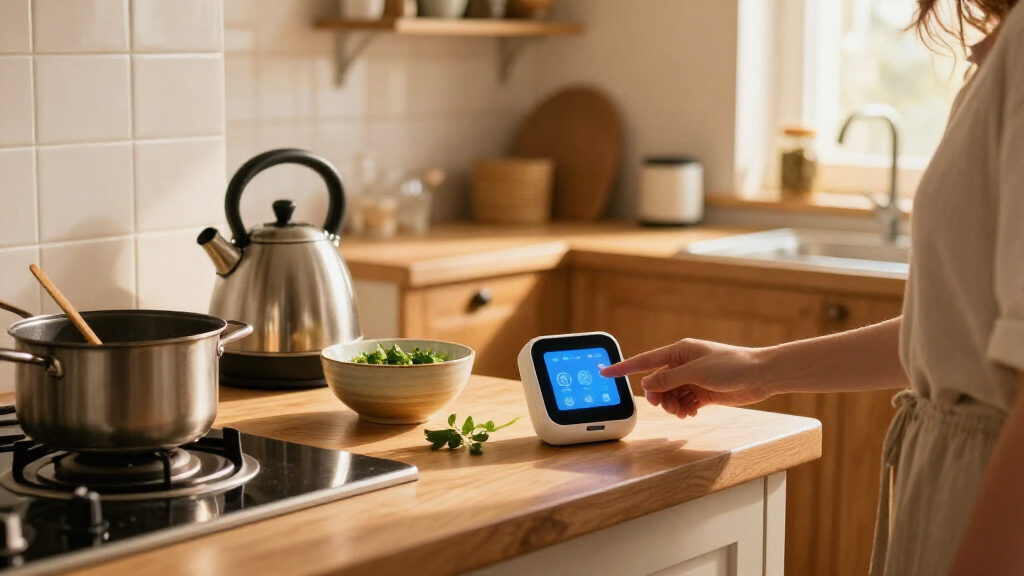

Choosing a smart home device for the kitchen comes down to whether a screen will earn its counter space. A smart display can show recipes, measurements, timers and compatible camera feeds; a smart speaker gives you hands-free voice control, music and timers in a smaller, usually less expensive package. Both can connect to compatible lights, plugs and other smart home devices, but their usefulness depends on the services and products in your setup.

Get kitchen staples and gadgets delivered free with Prime
- Fast, free delivery on millions of items
- Prime Video, Amazon Music and more included
- Member-only deals all year

Echo Show 15 – 15.6" Full HD Smart Display with Built-in Fire TV
- ✔ Display: 15.6-inch Full HD (1920 × 1080), landscape or portrait
- ✔ Dimensions: 16.1 × 10.1 × 1.4 inches
- ✔ Weight: 4.96 lb
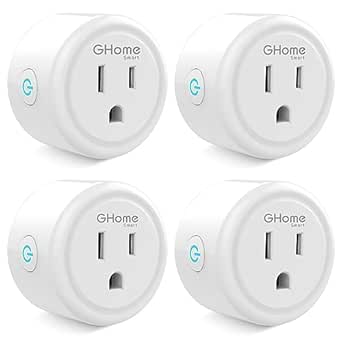
GHome Smart Plug Mini – Wi-Fi Outlet Works with Alexa & Google Home, Timer, App Control, 2.4 GHz Only, No Hub Required (4 Pack),…
- ✔ Pack quantity: 4 smart plugs
- ✔ Electrical rating: 120 V, up to 10 A/1200 W
- ✔ Wi-Fi: 2.4 GHz only

Echo Spot Smart Alarm Clock with Alexa, Black
- ✔ Display: 2.83-inch touchscreen, 240 × 320
- ✔ Dimensions: 4.5 × 4.1 × 4.4 inches
- ✔ Weight: 14.3 oz (405 g)
The display is the stronger choice for cooks who follow recipes or want visual information within reach. The speaker makes more sense if you mainly want to set timers, play audio and control devices without adding another screen to a room where hands are often wet or messy. The central tradeoff is practical: pay more and give up counter space for information you can see, or keep the setup simple and handle kitchen tasks by voice.
At a Glance
| Criteria | Smart display | Smart speaker | Winner |
|---|---|---|---|
| Recipe and visual guidance | Shows recipes, steps, measurements and other supported visual information | Voice guidance only; no recipe screen | A |
| Hands-free timers and voice control | Supports voice requests; screen can show timer status and related details | Good for timers, reminders and voice requests | Tie |
| Smart home controls | Can show visual controls for compatible devices; features vary by platform | Voice control for compatible devices, with no visual dashboard | A |
| Audio | Can play music and audio; sound quality varies by model | Often a strong fit for music and spoken audio at a lower price | Depends |
| Counter space and cleaning | Takes more space and has a screen that needs cleaning | Usually compact and easy to place away from food prep | B |
| Privacy and screen upkeep | Adds a camera or screen only on models that include them; requires display upkeep | No screen; microphones still listen for wake words and settings differ by model | B |
| Value | Costs more, with added value for frequent visual use | Usually the better value for timers, audio and basic device control | Depends |
Echo Show 15 – 15.6" Full HD Smart Display with Built-in Fire TV
For a kitchen where people check schedules, recipes, or household updates at a glance, the Echo Show 15 offers the broadest set of tools in this lineup. Its 15.6-inch Full HD display gives widgets and video room to be useful from across a kitchen, and built-in Fire TV adds entertainment without another streaming box. Compared with the Echo Spot, this is a true visual centerpiece rather than a compact clock with Alexa.Its hub support is another advantage: Zigbee, Matter, and Thread give it more ways to connect compatible smart home devices than the Echo Spot, while Sidewalk adds another supported network feature. That breadth makes it a better choice when the kitchen display will also help manage lights or other connected devices. The 13 MP camera with a shutter and auto-framing can make video calls practical while hands are busy, though some households may prefer a camera-free device like the Spot.The tradeoff is physical commitment. At nearly five pounds and over 16 inches wide, it needs a suitable mounting location or generous counter space, and installation deserves more thought than placing the Spot beside a kettle. Its large screen is useful only if the kitchen has a clear viewing spot and the household wants a permanent display. Choose it for a shared command center; skip it if you want a discreet clock or simple outlet automation.
Pros:
- Large Full HD screen gives widgets, video, and household information space to be readable.
- Built-in Fire TV provides streaming without a separate player.
- Zigbee, Matter, Thread, and Sidewalk support broaden its smart home hub role.
- Camera shutter and auto-framing support video calls while users move around the kitchen.
Cons:
- Its nearly five-pound weight and wide footprint make placement and mounting more involved.
- The camera and large display may be unnecessary for buyers who only need a clock or voice control.
- Bluetooth hands-free voice control is not supported for Mac OS X devices.
Best for: Households that want a large, shared kitchen dashboard, video calling, entertainment, and a device that can connect to several smart home standards.
Not ideal for: Anyone with limited wall or counter space, seeking a lightweight device, or primarily looking to automate a small number of appliances.
Bottom line: We recommend the Echo Show 15 for kitchens that can accommodate a permanent, feature-rich display and will make use of its hub and video capabilities.
“We recommend the Echo Show 15 for kitchens that can accommodate a permanent, feature-rich display and will make use of its hub and video capabilities.”
GHome Smart Plug Mini – Wi-Fi Outlet Works with Alexa & Google Home, Timer, App Control, 2.4 GHz Only, No Hub Required (4 Pack),…
The GHome Smart Plug Mini is the most direct choice here for turning compatible kitchen appliances into scheduled or voice-controlled devices. The four-pack lets us place control at several outlets, and the GHome app supports schedules, auto-off timers, and group management. Unlike either Echo, it does not provide a screen, speaker, or smart home dashboard; its job is to add control to an outlet with minimal hardware.That focused role can make it more useful than the Echo Spot when the goal is automating a compatible lamp or other suitable device. It also works with Alexa and Google Home, so it does not require an Echo display as the control point. Setup does require the GHome app before linking a voice assistant, and the plugs need 2.4 GHz Wi-Fi. Buyers with a network setup that only offers 5 GHz access should account for that limitation before choosing this pack.Kitchen use requires a careful look at the electrical rating. Each plug is rated up to 10 A/1200 W at 120 V, so we should check an appliance’s requirements and follow its manufacturer’s guidance before connecting it. A smart plug is not a way to make every high-load or heat-producing appliance remotely safe. For suitable loads, these compact plugs offer more scheduling reach per purchase than either Echo; for kitchen information, calls, or a broad device hub, the Echo Show 15 is the much more capable pick.
Pros:
- Four plugs provide outlet control in multiple kitchen or household locations.
- Schedules, auto-off timers, and group control support simple routines.
- Works with Alexa and Google Home without a separate smart home hub.
- Compact body and stated ETL and FCC certifications support a straightforward outlet setup.
Cons:
- Supports 2.4 GHz Wi-Fi only and requires GHome app setup before voice assistant linking.
- The 10 A/1200 W rating limits which appliances are appropriate to connect.
- It has no display or built-in voice interface, so interaction depends on the app or another assistant.
Best for: People who want to schedule or voice-control several compatible, lower-load devices from outlets and already have 2.4 GHz Wi-Fi.
Not ideal for: Buyers seeking a kitchen display or clock, households relying on 5 GHz-only Wi-Fi, or anyone needing control for appliances above the stated power rating.
Bottom line: We’d choose this four-pack for compatible appliances that benefit from schedules, provided their load and the home Wi-Fi meet its limits.
“We’d choose this four-pack for compatible appliances that benefit from schedules, provided their load and the home Wi-Fi meet its limits.”
Echo Spot Smart Alarm Clock with Alexa, Black
When counter space is scarce, the Echo Spot keeps Alexa and basic visual updates within reach without the scale of the Echo Show 15. Its 2.83-inch touchscreen can show the time, weather, and song information, making it a natural fit near a breakfast nook or in a kitchen corner where a quick glance is more useful than a large dashboard. The Spot is also the simplest of these picks to place: it is a compact clock rather than a wall-mounted screen or a plug that needs an app-led setup.For kitchen routines, the small screen is both its defining strength and its limit. It can make a clock and simple updates visible, but it cannot offer the same room for widgets, streaming, or video calls as the Show 15. There is no camera, and it does not list the Show 15’s Zigbee, Matter, or Thread hub support. We should choose it for voice access and a compact display, not as the center of a broad connected-home setup.The built-in speaker provides full-range audio, and Alexa voice control can manage compatible smart home devices. Its eero Built-in feature may extend Wi-Fi when paired with a compatible eero router, though that benefit depends on equipment the buyer already owns. Compared with the GHome pack, the Spot gives us an always-available assistant and visible clock, while the plugs do more for scheduling appliances. Recycled materials and privacy controls are welcome considerations, but buyers who need a camera or a large cooking companion display should look to the Show 15.
Pros:
- Compact footprint suits a crowded counter or small breakfast area.
- Touchscreen shows time, weather, and song information at a glance.
- Built-in full-range speaker and Alexa voice control support everyday assistant use.
- Made with 36% recycled materials and includes privacy controls.
Cons:
- The 2.83-inch screen is far less useful for detailed visual information than the Echo Show 15.
- No camera, and it lacks the Show 15’s listed Zigbee, Matter, and Thread hub support.
- Wi-Fi extension requires a compatible eero router.
Best for: People who want an Alexa-enabled clock with glanceable time, weather, and music information in a small kitchen space.
Not ideal for: Anyone who needs a large recipe or household dashboard, video calls, or the broader smart home hub connectivity of the Echo Show 15.
Bottom line: We’d pick the Echo Spot when a compact clock and Alexa matter more than a large display, camera, or appliance scheduling pack.
“We’d pick the Echo Spot when a compact clock and Alexa matter more than a large display, camera, or appliance scheduling pack.”
As an Amazon Associate we earn from qualifying purchases.
Key Differences
The clearest gap is visual help. A smart display can keep a recipe step, timer or measurement visible while you cook, which is useful when checking a phone would mean touching it with messy hands. A smart speaker can read instructions aloud and respond to follow-up questions, but it cannot show the recipe or let you glance at progress. If visual guidance is part of your routine, the display earns its extra cost; if you mostly cook from memory, its screen may go unused.
For basic kitchen voice tasks, the two are closer. Both can set timers, answer questions, play audio and control compatible devices, though capabilities depend on the assistant and connected products. The speaker has an advantage in simplicity: it is generally smaller, cheaper and free of a display that needs wiping. The display is a more capable kitchen station, but its benefits depend on placement, supported services and whether you want a screen near cooking splashes and grease.
Value follows the same split. A speaker is the sensible buy for voice control, music and timers. Pay extra for a display when you will regularly use its recipe view, visual timer or other screen-based features. Neither device should be assumed to control every smart home product; check compatibility with your lights, plugs and appliances before buying.
Detailed Comparison
Recipe and visual guidance (Smart display wins — major)
The smart display wins by a major margin. It can show supported recipes, ingredients, measurements and steps, giving you something to glance at without picking up a phone. A smart speaker can provide spoken instructions, but you must remember or listen for each step. Choose the display if you cook from online recipes often; for familiar meals and occasional questions, the speaker is enough.
Hands-free timers and voice control (minor difference)
This is a tie for most everyday requests. Both can set timers, answer questions, play audio and respond to voice commands, subject to the assistant and services available. A display may make the timer easier to check at a glance, but the speaker can perform the core task just as well. For cooks who mostly use voice commands, the screen adds convenience rather than a new capability.
Smart home controls (Smart display wins — moderate)
The display has a moderate edge when visual controls matter. It may provide a touch interface or dashboard for compatible lights and other devices, while the speaker relies on voice. Neither guarantees broad appliance control: compatibility depends on the device, platform and setup. Choose the display if you want to check or tap controls; choose the speaker if voice commands cover your needs.
Audio (moderate difference)
The winner depends on the models and your priorities. Both play music, podcasts and spoken responses, but sound quality varies widely across price tiers. A speaker may offer better audio for the money because you are not paying for a screen; a display can still be adequate for background listening. Compare the specific models if sound is a major reason for buying.
Counter space and cleaning (Smart speaker wins — moderate)
The smart speaker wins by a moderate margin. It is usually smaller and has no screen to wipe, which helps in a crowded kitchen or near a messy prep area. A display needs a stable spot where it remains visible and less exposed to spills and grease. The difference is modest in a spacious kitchen, but can decide the choice on a tight counter.
Privacy and screen upkeep (Smart speaker wins — minor)
The speaker has a minor simplicity advantage. Neither type is entirely free of privacy settings: both use microphones for voice interaction. Some displays include cameras, while others do not, so check the exact model and its controls. The speaker avoids screen upkeep and camera concerns tied to models that include one, but privacy settings still deserve attention with either device.
Value (major difference)
The better value depends on whether you use the screen. A speaker generally costs less and covers the basics well, so it is the stronger buy for timers, music and voice control. A display justifies its higher price for frequent recipe viewing, visual timers or touch controls. If those features would be occasional novelties, keep the money and choose the speaker.
Smart display: Pros and Cons
Pros:
- Shows supported recipes, steps and measurements while you cook
- Makes timers and compatible smart home controls visible
- Can combine voice assistance with touch interaction
Cons:
- Costs more than a basic smart speaker
- Uses more counter space and needs screen cleaning
- Visual features depend on service and device compatibility
Smart speaker: Pros and Cons
Pros:
- Usually costs less and takes up less space
- Handles timers, voice requests and audio without a screen
- Simpler to place away from splashes and food prep
Cons:
- Cannot show recipes, measurements or visual controls
- Spoken directions can be harder to follow while busy
- Audio quality varies by model, as it does with displays
Who Should Choose What
Choose Smart display if:
- You regularly follow recipes and want steps or measurements visible.
- You want to check timers or control compatible devices with a glance or tap.
- You have counter space in a spot away from routine spills and grease.
Choose Smart speaker if:
- You mainly want voice timers, music, reminders and basic smart home control.
- Your kitchen counter is crowded or you prefer fewer screens in the room.
- You would rather spend less than pay for visual features you may rarely use.
Skip both if: Skip both if you do not want an always-available voice assistant in the kitchen, or if your devices and services are not compatible with the assistant you would choose.
Value for Money
A smart speaker is better value for most people who want a kitchen device for timers, music and basic voice control. It covers those jobs at a lower cost and takes less counter space. Paying more for a smart display is worthwhile when its screen will be used regularly for recipes, visible timers or touch controls. If you are unsure whether you need those features, the speaker is the safer value; upgrade to a display only when visual guidance solves a real cooking problem.
Final Verdict
For most kitchens, start with a smart speaker: it handles the common voice tasks at lower cost and is easier to fit around food prep. Choose a smart display if you frequently follow recipes, need to see measurements or want a visual interface for compatible devices. The deciding factor is whether you will use the screen several times a week. If yes, the display is worth paying more for; if not, buy the speaker and keep the counter space.
Frequently Asked Questions
Is a smart display better for cooking than a smart speaker?
It is better for cooks who want recipes, steps and measurements on screen. A speaker is sufficient if voice timers and spoken answers cover the way you cook.
Can both devices control kitchen appliances?
They can control compatible smart devices, but compatibility varies by product and assistant. Check the appliance or hub requirements before buying; neither device automatically controls every appliance.
Is a smart display worth the extra cost?
It is worth paying more if you will regularly use recipe views, visible timers or touch controls. For music, timers and basic voice commands, a speaker is usually the better value.
Which device is easier to keep clean in a kitchen?
A smart speaker is generally easier because it has no screen to wipe and can be placed away from prep areas. Keep either device clear of splashes, grease and spills, and follow the manufacturer’s cleaning guidance.